 Show Working


"I've done every past paper. Twice."
Fresh questions, every time
Each question is made as you practise, so you never run out and can't learn the answers off by heart.
GCSE revision appiPhone, iPad, Android, computers
Show Working gives you fresh GCSE maths questions every time you practise, then shows the working for every answer, one step at a time. Ten minutes a day, Foundation or Higher.
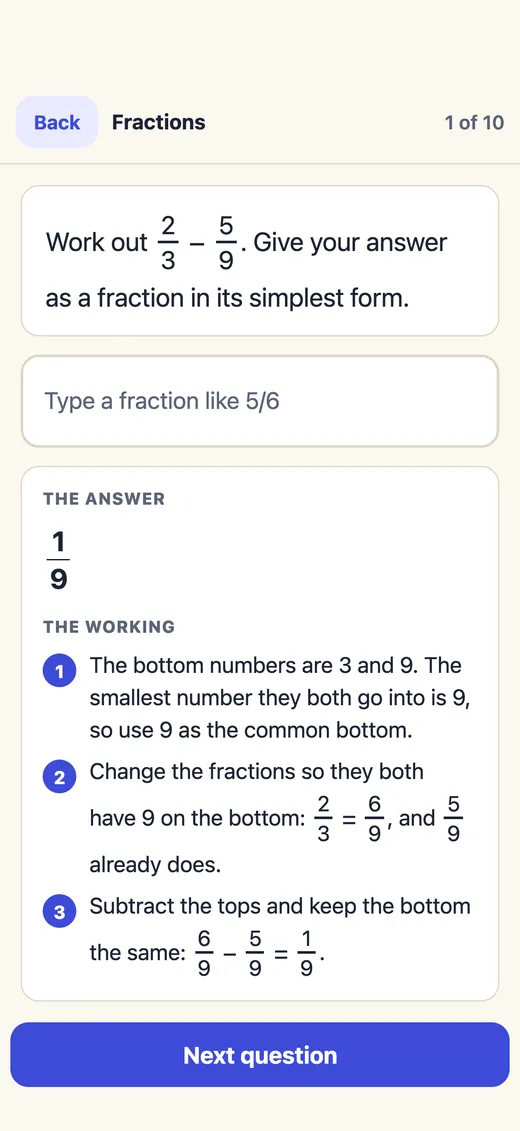
Work out 23 − 59. Give your answer as a fraction in its simplest form.
00 / Subjects16 GCSE subjects in one app
Every subject is matched to your exam board, with the first topic free. Open one to try its questions now.
01 / Sound familiar?What pupils and parents tell us
Most revision stalls for one of a few reasons. Each one has a fix inside the app.
"I've done every past paper. Twice."
Each question is made as you practise, so you never run out and can't learn the answers off by heart.
"The answers say 1/9. But how?"
Every step, in plain words, straight after you answer. Not just the number at the end.
"There are questions all over the internet. Where do I start?"
Today's ten minutes mixes something new with the topics you find tricky. No searching, no PDFs.
"I keep losing marks for not showing my working."
Write your working on the pad with a finger or Apple Pencil, then compare it with ours, line by line.
"Mocks feel nothing like the real thing."
A timer, no hints and no answers until you hand in. The clock keeps running if you leave the app.
"Revising on my own is boring."
Send the same ten questions in one short code and see who gets more right first time.
Parents and carers
"Not another subscription."
The first topic of each subject is free. Then each subject is one payment of £9.99, or £24.99 for all of them. Nothing renews, ever.
Parents and carers
"Who sees my child's data?"
No account needed, no adverts, no tracking. Progress stays on their own devices and in their own iCloud.
02 / How it worksPhone, tablet or computer


Ten questions, picked from what you need most. Or choose the topic your class is on.
The maths keyboard has fractions, powers and brackets. No fiddly typing.
See the method one step at a time. That's where the method marks are.
New / In version 1.2Exam marks, a buddy, friends
03 / Why not just use free questions?An honest comparison
| What matters | Free questions online | A typical revision app | Show Working |
|---|---|---|---|
| Questions | Run out, and you start to remember the answers | A fixed bank you work through | Made fresh every time, so they never run out |
| When you get one wrong | The final answer, or a mark scheme written for examiners | Often just the right answer | Every step, in plain words |
| What to do next | Up to you to work out | Sometimes suggested | Today's ten minutes, picked for you |
| Exam practice | Past papers, once each | Varies | New mock papers under exam rules, as often as you like |
| Cost | Free, often with adverts | Often a monthly subscription | First topic free, then one payment. Nothing renews |
| Your data | Often adverts and trackers | Usually an account | No account needed, no adverts, no tracking |
| No signal | Needs the internet | Varies | Works offline, on the bus or anywhere |
Free past papers are still great practice. Show Working is for the days in between: short, fresh and with the method every time. Read the full comparison.
04 / Find it fastThree ways to check yourself
Revision goes better when you can check a thing the moment you wonder about it, not after ten minutes of searching.
Every topic page on this site works the same way: try the questions, then open the answer and the working. Start with a maths topic.
05 / TopicsFoundation and Higher
They follow the GCSE maths content every exam board in England uses. Each topic page has worked examples and questions to quiz yourself on, made by the app itself.
See every topic and what it covers
06 / Checked, not guessedWhy you can trust the answers
maths questions checked against a second, separate maths engine. 0 problems found.
Our own checker, 7 Nov 2026kinds of question across all 55 GCSE maths topics, Foundation and Higher.
Every area of the courseaccounts, adverts or trackers inside the app.
See our privacy policydays until the first GCSE exam on 10 May 2027.
Check your own timetableQuestions follow the Department for Education's GCSE maths subject content, which every exam board in England uses. Every question is our own: we never copy past papers. Spot something wrong? One tap reports the exact question.
07 / Quick answersAll questions
Show Working is a GCSE revision app for iPhone and iPad, made in the UK by Boroto Ltd. It covers 16 GCSE subjects, from Maths, English and Science to History, Geography and languages. In Maths you get fresh questions every time, the working shown for every answer, mock papers under exam rules, and challenges you can send to a friend.
Show Working is on the App Store for iPhone and iPad. Search for Show Working, or use the App Store button on this page.
Yes. Look up searches every subject you have: type a word like osmosis, Pythagoras or Lady Macbeth and the answer shows straight away. Each science topic has Read the answers, a list of questions with the answers covered until you tap. Each maths topic has Show me one, a fresh worked example with every step.
The first topic of each subject is free. Each subject is then a single payment of £9.99, or £24.99 for every subject. On iPhone and iPad you pay in the app. On Android phones and computers you pay by card in your browser at showworking.co.uk/app, after signing in, and what you buy opens on every device you sign in on. There is no subscription and nothing renews.
Yes. Show Working follows the Department for Education's GCSE maths subject content, which AQA, Pearson Edexcel, OCR and WJEC Eduqas all use. It is independent and not connected to any exam board.
Both. You choose Foundation or Higher when you start and can switch at any time. Most kinds of question are on both tiers. A few, such as reverse percentages and calculating in standard form, are Higher only.
Every answer is worked out by exact maths, not guessed, and every kind of question is checked thousands of times against a separate maths library before it is released. If you ever think one is wrong, tap Report a wrong question under it and send us the code.
Yes. Multi-step problems has 52 kinds of exam-style question worth 3, 4 or 5 marks, across number, algebra, ratio, geometry, probability and statistics, the way real papers ask them. Each one shows how its marks are given, one line per mark.
If you get an exam-style question wrong, tap Mark my method. Show Working asks you for the key steps one at a time, then shows the marks an examiner would give for them, like "You would get 2 of 4 marks", with the full working and how each mark is given. It is worked out by exact maths, never by an AI.
Stub is the pencil in Show Working. Now and then Stub says a few words in a small bubble: a cheer for a streak, a reminder of how your last set went, or a handy tip. It is at most three times a day, never during a question or a mock, and you can switch it off in Settings, Appearance.
Yes, in every subject with calculations, including Maths, Science, Business, Computer Science and Statistics. After a set, tap Challenge a friend: they get the same ten questions from one short code, even if they are on a different exam board, and can send their score back.
Ten minutes. That's it.
Free to download. Your first topic stays free, for good. No account needed.
On a computer? Use it free in your browser