 Show Working


Revision guideAndroid, Chromebook, laptop
Free GCSE revision online, in your browser
Show Working runs in any web browser at showworking.co.uk/app: on an Android phone, a Chromebook, a laptop or a family computer. It is free to start, needs no account, and has the same questions and worked answers as the iPhone app.
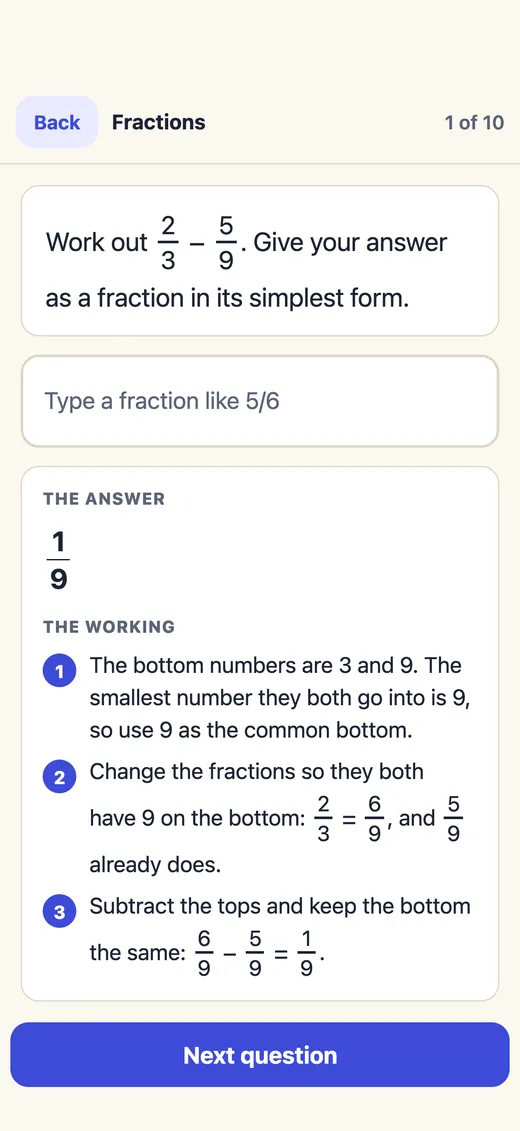
Every answer comes with the working, step by step, so you see where a mark was lost, not just that it was.
On a computer? Use it free in your browser
01 / What you getThe same as the app
What you can revise online
- 16 GCSE subjects, from maths, English and science to history, geography, languages and more, each with your exam board and tier.
- Worked answers. Get one wrong and the working opens, step by step, in plain words.
- Fresh maths questions every time across 55 topics, worked out by exact maths, so you can't learn the answers by heart.
- Friends' challenges. Send a link, answer the same ten questions, and see who gets more right, iPhone or Android.
- Works without signal once it has opened, because your browser keeps a copy of the app.
What's free, and what isn't
The first topic of every subject and every friend's challenge are free in the browser, for as long as you like. The rest of a subject is a one-off payment of £9.99, or £24.99 for every subject, with no subscription. You can buy in the web app too, by card after signing in, and what you buy opens wherever you sign in, including the iPhone and iPad app.
02 / AndroidNo Play Store needed
On an Android phone, make it an app
Open it in Chrome
Go to showworking.co.uk/app in Chrome, or any other browser you use.
Add it to your home screen
Tap the menu (the three dots), then Add to Home screen or Install app.
Open it like an app
It gets its own icon and opens full screen, with no address bar.
Start with today's ten minutes
Pick your subject, exam board and tier, and Show Working chooses ten questions for you.
03 / ComputersLaptop, Chromebook, desktop
On a computer, use the keyboard
- A sidebar keeps every subject and page one click away, with one page at a time beside it.
- Type your answer and press Enter. Use * for times and ^ for powers.
- Mock papers take typing too, and Enter moves to the next question without handing the paper in.
04 / On this websiteFree, no sign-up
Free questions on every topic
Every subject on this website has topic pages with questions, answers and the reason for each, free to read and print for your own revision.
05 / Every deviceOptional
Keep your progress on every device
You never need an account. If you want your progress on your phone, tablet and computer, sign in with Apple, Google or your email in Settings, Account and sync. Sign in the same way on each device and your progress is the same on all of them.
Without signing in, your progress stays in that browser. Clearing the browser's site data deletes it.
06 / QuestionsAll questions
Revising online, answered
Can I revise for GCSEs online for free?
Yes. Open showworking.co.uk/app in any browser. The first topic of every subject and every friend’s challenge are free, with the working shown for every answer, and there is no account to make. The topic pages on this website are free too.
Does Show Working work on Android?
Yes, in Chrome or any other browser at showworking.co.uk/app. Tap the menu, then Add to Home screen or Install app, and it opens like an app with its own icon. There is no Play Store download.
Can I use it on a Chromebook or a laptop?
Yes. On a computer it has a sidebar for every subject and page, and you type answers on the keyboard and press Enter, with * for times and ^ for powers.
Does it work offline in a browser?
Once it has opened in your browser, the browser keeps a copy of the app, so it opens and works without signal. Progress saves on the device and, if you have signed in, goes to your account when you are back online.
Can I buy subjects on the web?
Yes. In the web app, tap a locked topic, sign in, then pay by card: £9.99 a subject or £24.99 for every subject, once, with no subscription. What you buy opens wherever you sign in with that account, including the Show Working app on iPhone and iPad.
Is my progress the same on my phone and my computer?
If you sign in with Apple, Google or your email on both, yes. Without signing in, progress stays in the browser or device you used.
More revision guides
No download needed.
Start revising in your browser.
The first topic of every subject is free, with the working shown for every answer.